
Biometric Access & Workforce Services in Rwanda
Fingerprint and facial-recognition attendance and access control for staff and premises.
Biometric Access & Workforce
The 7 Biometric Access & Workforce services
-
Fingerprint Attendance Systems
Fingerprint clock-in terminals installed and tied into your attendance reporting.
-
Facial Recognition Systems
Facial-recognition attendance and access, for contactless clock-in at entrances.
-
Employee Access Control
Access permissions tied to employee role and shift, not a shared PIN everyone knows.
-
Time Attendance Management
Attendance data collected and reported in a form payroll can actually use.
-
Staff Access Monitoring
A log of staff movement through controlled doors, reviewable when something needs checking.
-
Biometric Device Installation
Biometric terminal installation and network integration across one or multiple sites.
-
Attendance System Management
Ongoing administration of attendance devices, users and reporting rules.
Paper registers and shared access cards fail the same way: they rely on trust that’s easy to abuse and hard to audit after the fact. A biometric attendance system in Rwanda from GENIUS replaces them with a record tied to the individual, at the door and on the timesheet. We cover choosing the right terminal for your site, installing it, connecting it to payroll, and running it afterwards. We also cover the data protection side, because biometric data carries specific legal obligations.
What this covers
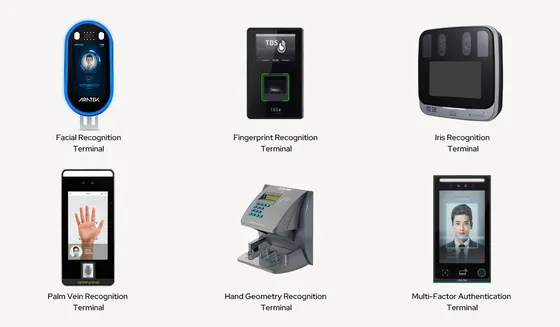
Recording attendance. Fingerprint attendance systems and facial recognition systems capture clock-in and clock-out at the entrance. Time and attendance management turns raw clock-ins into hours, lateness, overtime and absence reports that payroll can use.
Controlling access. Employee access control sets who may enter which areas, and at which times, by role and shift rather than a shared PIN everyone knows. Staff access monitoring keeps a reviewable log of movement through controlled doors. Visitor and perimeter entry systems sit under CCTV & Surveillance Security.
Installing and running it. Biometric device installation covers mounting, cabling and network integration, single or multi-site. Attendance system management handles the ongoing work: enrolling new staff, removing leavers, adjusting shift rules and keeping firmware current.
Biometric data and Rwanda’s data protection law
Rwanda’s Law N° 058/2021 on the protection of personal data and privacy lists “genetic or biometric information” among its categories of sensitive personal data (Article 3). A fingerprint or face template used for attendance falls within that, so an attendance system is not just an HR tool; it’s sensitive data processing.
In practice, that means a few things should be decided deliberately rather than left to the device’s defaults:
- Why the data is collected, and that staff are told clearly before enrolment.
- Who can access templates and logs, limited to named administrators.
- How long records are kept, and that leavers’ templates are deleted rather than kept indefinitely.
- Where the data is stored, especially if the attendance software is a cloud service hosted outside Rwanda.
- Registration of your organisation as a data controller with the National Cyber Security Authority, which the law requires.
We aren’t lawyers and don’t give legal opinions. We configure the system so these decisions can be implemented and evidenced, and we document how the system handles data for your HR, legal or compliance lead.
Choosing the right terminal for your site
The device decision depends more on the site than on the brochure.
Staff numbers and changeover peaks. A factory where 200 people arrive within 15 minutes needs fast terminals, more than one per entrance, or face recognition that doesn’t need a queue at a single scanner.
Working conditions. Construction, agricultural and manufacturing staff often have worn or dirty fingertips, which makes fingerprint recognition unreliable. Face recognition, or cards with a fingerprint fallback, work better there.
Environment. Outdoor gates need weather-rated terminals; dusty sites need terminals that are easy to clean and positioned away from direct sun, which also affects face recognition.
Power and connectivity. Terminals should keep recording through a power cut, on a small UPS, and through an internet outage, storing records locally until they can sync.
What drives cost
We quote after a site visit, because the same headcount can need very different systems. The main drivers are:
- Number of entrances and terminals, including any extra terminals needed to avoid queues at shift changes.
- Terminal type: fingerprint terminals cost less than face recognition, and outdoor-rated units cost more than indoor ones.
- Door hardware for access control, such as electric locks, exit buttons and door sensors, which often costs more than the terminals.
- Cabling and network work to reach each terminal.
- Software and payroll integration: a standard export is simple; a direct link into a specific payroll system takes more work.
Mistakes we see most often
Buying terminals before deciding the payroll format. The terminal records perfectly, then someone retypes every report because the export doesn’t match payroll.
Poor enrolment. Enrolling one finger per person, in a rush, guarantees daily failures. Enrolling several fingers, carefully, prevents most of them.
No plan for leavers. Former staff stay enrolled, which is both a security gap and a data protection problem.
Terminals installed facing the sun, where face recognition struggles every morning and evening.
How the engagement works
Assess. We look at entrance layout, headcount, shift patterns, site conditions and how attendance currently reaches payroll.
Design. We choose terminal type and placement, the access rules per area, the payroll export format, and how biometric data will be stored and retained.
Deploy. We install and connect terminals, configure the software, and run enrolment sessions, with clear information for staff beforehand.
Secure. Administrative access is restricted to named people, default passwords are changed, and data retention is configured.
Support. We enrol and remove staff, adjust rules as shifts change, maintain devices and keep firmware current.
Who it’s for
Manufacturers and larger employers that need accurate shift attendance and overtime records.
Schools tracking staff attendance and restricting access to offices, stores and exam rooms.
Hotels and hospitals controlling access to back-of-house areas, pharmacies and records rooms.
NGOs and government offices that need an auditable record of attendance and access.
SMEs still relying on a paper register or an honesty-based sign-in sheet.
What we’ll need from you
- Staff headcount, shift patterns and peak arrival times.
- The entrance layout and floor plan, or site access for a walkthrough.
- How attendance data reaches payroll today, and a sample of the format payroll uses.
- For access control, which areas need restriction and who may enter each.
- A contact from HR or management who can decide retention and staff communication.
How it works
From first call to ongoing support
- 01
Assess
We map what you have — network, security posture, systems — before recommending anything.
- 02
Design
A plan sized to your sites, staff and budget, not a generic package.
- 03
Deploy
Installation and configuration scheduled around your working hours.
- 04
Secure
Access control, monitoring and patching set up from day one.
- 05
Support
Maintenance and a helpdesk that already knows your setup.
Who we work with
Sectors we work with
-
Banks and MFIs
Uptime, audit trails and segmented networks that hold up to a regulator’s questions.
Financial sector IT -
NGOs and international organisations
Secure access for staff across offices and field sites, on budgets that answer to donors.
IT for NGOs and development work -
Schools
Wi-Fi that copes with a full classroom, managed devices and attendance that runs itself.
-
Health facilities
Systems that stay up around the clock and keep patient records private.
Healthcare IT -
Hotels
Guest Wi-Fi, payment security and cameras that cover every entrance.
Hospitality technology -
Government agencies
Documented infrastructure with a clear handover, so accountability doesn’t leave with a supplier.
Solutions
Where this fits into a wider package
Insights
Related reading
-
.Bty1UFki_ZFLEIL.webp)
, 4 min read
Biometric Device Installation for Schools in Rwanda
Schools have specific biometric installation needs — student versus staff device use, placement height for younger students, and durability.
-
.BmVRvk_a_Z21LBXR.webp)
, 4 min read
How Much Does Biometric Device Installation Cost in Rwanda?
Biometric device installation cost depends on device count, wiring requirements, and integration with existing systems — here's the breakdown.
-

, 4 min read
Signs Your Business Needs Staff Access Monitoring
Specific, practical signs — not general caution — that indicate your organisation would genuinely benefit from staff access monitoring.
Frequently asked questions
Fingerprint or facial recognition — which is better for attendance?
Neither is better everywhere. Fingerprint terminals cost less and are well proven, but struggle with worn, dirty or wet fingers. Facial recognition is faster at busy entrances, needs no contact and copes better on dusty or industrial sites, but costs more and needs careful positioning and lighting. We recommend based on staff numbers, shift changeover crowds and site conditions.
Can biometric attendance data feed directly into payroll?
Yes, with the right export or integration. Attendance software can produce reports of hours, lateness, absences and overtime in a format your payroll process or software accepts, which removes manual timesheet reconciliation. We confirm the exact format your payroll needs before installation, because mismatched exports are the most common reason attendance data ends up retyped by hand.
What happens if a fingerprint doesn't register for some staff?
It happens for a small share of people, usually because of worn or damaged fingerprints from manual work. Terminals are configured with a fallback, such as a PIN, a card or face recognition, so those staff can still clock in. We enrol several fingers per person during setup, which reduces failures considerably before any fallback is needed.
Can one system manage attendance across multiple office locations?
Yes. Terminals at each site report into one central system over the network or internet, giving you a single attendance record across locations instead of separate logs to reconcile. Where a site's connection drops, terminals store records locally and upload them once it returns, so attendance isn't lost during an outage.
Is biometric data stored securely?
It should be, and the law expects it. Most systems store a mathematical template rather than an actual fingerprint or face image, and access must be limited to named administrators. Rwanda's data protection law treats biometric information as sensitive personal data, so we configure restricted access, encryption where supported and documented retention as standard.
How long does installation take for a single office?
A single entrance with one or two terminals typically takes a day, including mounting, network setup, software configuration and initial staff enrolment. Enrolling a large workforce can take longer than installing the terminals, so for bigger sites we schedule enrolment sessions by department. Multi-site rollouts are planned site by site.
Still tracking attendance on paper?
Tell us your staff count, sites and shift patterns. We’ll recommend devices and the software behind them.